XABCD TRADING

CHANGE LOG
XABCD Pattern Suite
v1.7.0.73
August 2026
This one is all about the XABCD Support window — the window you open when something needs reporting. It grows a Start New Log button, so a capture of the problem you are reproducing holds that and nothing else; until now clearing that file was impossible without closing NinjaTrader, which loses the very thing you were trying to capture. Copy Diagnostics is now the one button on that window you cannot miss, the row of buttons no longer disappears off the edge when the window is narrow, and the version check now catches a Stream Deck plugin that is ahead of the NinjaTrader add-on as well as one that is behind it. Pattern detection and the alerts board are unchanged in this build — the Pattern Suite moves to 1.7.0.73 so that it matches the shared library it is compiled against, and the Support window stops reporting a version mismatch against it.
✨ New Features
- Start New Log, on the XABCD Support window next to Copy Diagnostics. It closes the current trace log, keeps it alongside with a ".1" in the name, and starts a fresh one — so when support asks you to reproduce something, the log you send back contains that and not the whole session in front of it. This was not something you could do for yourself: NinjaTrader holds the log file open for as long as it is running, so deleting or renaming it in Windows returns "the action can't be completed because the file is open in NinjaTrader", and the only way to a clean file was to close NinjaTrader and lose the state you were trying to capture. Nothing is thrown away — everything written before you click is in the file kept beside the new one, and the new file says so in its first line
⚠ Bug Fixes
- The buttons on the XABCD Support window no longer disappear when the window is narrow. The row was laid out in a way that could not wrap, so narrowing the window pushed it off its own left edge and the window cut it off there — Support Portal rendered as "ort Portal", and Refresh, Copy Diagnostics and Start New Log were gone altogether, with no scrollbar to reach them and nothing on screen to say the window was too small. Save Settings and Cancel survived only because they happen to sit at the end of the row. The buttons now wrap onto a second line instead, and the window has a minimum size it cannot be dragged below
- The version check now catches a Stream Deck plugin that is ahead of the NinjaTrader add-on. It compared the two one way round only, so it warned when the plugin was behind and said nothing at all in the mirror case — which is the more likely half to happen, because the plugin updates with a double-click while the add-on needs an installer and a restart. A trader who updated only the plugin got new keys on his deck, configured correctly, that did nothing when pressed, and the Support window sitting in front of him with both version numbers on it gave him no reason to look at them. It says so now, and so does the report that Copy Diagnostics puts on your clipboard, which is the one support actually reads
⬆ Improvements
- Copy Diagnostics is now the one button on the Support window you cannot miss. It is what support asks for on nearly every ticket — it is how a report arrives with your versions, settings, license state and the tail of the log already attached, instead of after three rounds of email — and it was the second of seven identical buttons with nothing about it saying it mattered more than Log Console. It now carries the accent colour and a copy icon, and sits on its own at the end of the row
v1.7.0.72
August 2026
Group by on the Alerts board works. Turning it on used to draw a correct header for every group and not one alert underneath any of them, whichever grouping you picked — that is fixed, and groups can now be collapsed as well, individually or all at once, with what you collapsed remembered the next time you open the board. The XABCD Properties window also stops being a dark navy panel on the light NinjaTrader skin.
✨ New Features
- Collapse a group on the Alerts board — click a group header to fold its alerts away, click it again to open it. The header keeps its count either way, so a collapsed group still tells you how many alerts are behind it, and a chevron shows which state it is in
- Collapse all / Expand all, next to Group by. One button, and its caption tells you what it will do next. It only appears when Group by is on, since with Group by set to None there is nothing to fold
- Collapsed groups are remembered between sessions, per Group by setting — so collapsing by instrument does not disturb what you had folded away by pattern, and switching between the two brings each one back the way you left it
⚠ Bug Fixes
- Group by no longer empties the Alerts board. Switching Group by to anything — instrument, pattern, timeframe, priority, day or direction — drew one header per group, correctly named and correctly counted, with no alerts under any of them, while the ungrouped board was fine. The board no longer asks NinjaTrader's window framework to do the grouping for it: group headers are ordinary rows in the list now, and the alerts go down the same path the ungrouped board has always drawn correctly
- The XABCD Properties window is readable on the light NinjaTrader skin. Its toolbar strip and the tab strip below it were painted a fixed navy blue, which looks intentional on the dark skin and looks like a dark slab dropped into a pale window on the light one. Both now take their colours from whichever skin you are running, along with everything that sits on them
v1.7.0.71
August 2026
Custom patterns finally draw their reversal area whichever way you wrote the rules that place the last point, in all three display states, and the box on the chart is now the same band the indicator publishes and the scanner reports. The Alerts board gains pinning, learns to show forming patterns and keep them, and stops asking you to add the indicator to charts you never clicked on.
✨ New Features
- Pin an alert to the top of the board — click the star on a tile, or use Pin to top in its right-click menu, and that alert sorts to the top and stays there until you unpin it. With Group by set to None a pinned alert goes to the top of the board; with grouping on it goes to the top of its own group rather than jumping out of it. Pinned tiles carry a warmer background so the run of them reads as its own space, and the star stays nearly invisible until you hover it, so an unpinned board is not littered with stars
- A pin survives every Clear — Clear all, Clear read, Clear older than, auto-clear and the retention window all leave pinned alerts alone, and so does Live mode, which is the one filter a pin overrides. The stage, timeframe and instrument filters still apply, since those are you narrowing the board on purpose. If the pattern behind a pinned alert is gone, the tile is dimmed rather than removed, so it can never be mistaken for a setup still in play
⚠ Bug Fixes
- Custom patterns now draw a reversal area whichever rules place the last point. Only one way of writing that rule was ever recognised — the last point as a ratio of the previous leg — so a pattern that placed it against a different leg produced a band of zero height pinned to the previous point: invisible on the chart, and yet still fed into the confirmation filters, the point plots, the alert and the risk figure. The band is now worked out from every rule that touches the final point at once, so a pattern with four rules gets a tighter band than one with three, rather than one of them getting nothing
- The forming state draws its reversal area too. A forming custom pattern labelled with two arrows had no box at all, because the built-in shape it was being drawn with has no notion of a custom pattern and quietly collapsed the box onto a single point. Forming custom patterns are now drawn with the custom tool and handed the band that was already being calculated
- The box on the chart matches the band the pattern reports. The drawing tools used to work out their own reversal area from a single rule shape, so for the same pattern the box could sit at different prices from the band the indicator published and the scanner used. There is now one band, worked out once and handed to the tool
- The potential pattern stopped updating and NinjaTrader's log filled with warnings that a drawing tag was already in use by another tool type. The potential shape is drawn with one of five different tools depending on the pattern, and all five were using the same tag — NinjaTrader binds a tag to the first tool type that uses it and silently ignores the rest, so on any chart whose potential alternated between pattern shapes the drawing froze on the previous one. Each tool type now has its own tag, and the previous shape is removed before the new one is drawn
- Restarting NinjaTrader no longer throws up a run of "Add the XABCD Pattern Suite indicator to this chart" dialogs before data has even connected. Refreshing the Alerts board could move its own selection, and the board could not tell that move apart from you clicking a tile — so it acted on it. On a setup where charts do have the indicator loaded there was no dialog and the same path silently redrew patterns on your charts instead, which is the half worth knowing about
- Forming patterns can now reach the Alerts board on their own. A forming pattern was announced only when a different, already-detected pattern happened to occupy the same scanner cell — so the ordinary case, a cell whose only content is the forming pattern, never announced anything. Once on the board they also stay: a forming alert used to clear itself about a minute after arriving, and it now persists and updates in place as the pattern matures
- The Alerts board no longer goes completely blank when a filter hides everything. It counted the alerts it was holding rather than the ones actually on screen, so a board with four alerts all hidden by a filter showed no tiles and no help either — a blank window with nothing to suggest it was holding anything. It now tells the two situations apart, with different wording for "no alerts yet" and "alerts hidden by filters", and the second names the filters that are hiding them
- Regenerate in the Scanner and Alerts Sync Checker now clears its own Max Bar Count warning. The warning compared the template against your Detection Max Bar Count, but Generate wrote the template from a different, session-only field that defaulted to 10 and was never seeded from your setting — so pressing Regenerate rewrote 10 and the warning came straight back. There was only ever meant to be one Max Bar Count
- The Market Analyzer Template Builder's Highlight field described its unit as seconds in the tooltip while the label read milliseconds, and its default sat outside the range the field itself accepts. Both corrected, with the default now 500ms
v1.7.0.69 – 70
August 2026
A large custom-pattern and reversal-area release. Your own custom patterns can now be shown while they are still forming, every pattern type projects in the Market Analyzer instead of just one, and patterns that go stale now clear themselves out of a scanner cell. The reversal area is now worked out from every rule you wrote that places the pattern's final point rather than from one particular rule shape — so custom patterns that never drew a reversal area now draw one, the area appears on forming and unconfirmed patterns as well as completed ones, and Risk and RvR stop reading zero beside a pattern that plainly has both. Alongside that, a long run of fixes to places where the chart and the scanner quietly disagreed with each other.
✦ New Features
- Custom patterns can now be shown while they are still forming. A forming pattern's final point is projected from the rules you wrote, so an X-A-B-C that matches your definition is drawn with the zone where its last point would have to land. Custom patterns were previously left out of the forming display entirely, no matter how "Show Potential Patterns" was set
- Every pattern type now projects in the Market Analyzer. The scanner only ever stored one type as a forming pattern, so the same shape on the same instrument could show as forming on the chart and as nothing at all in the scanner
- Forming and unconfirmed patterns are now told apart at a glance — two arrows for a pattern still forming, one arrow for a pattern whose points are all in place but which failed one of your rules. The two used to look identical
- Reversal areas on patterns that have not completed — a custom pattern shown as forming, or shown with its points in place but a rule not yet met, now draws its reversal area the same way a completed one does. The zone you were waiting for price to reach was the one thing missing while you were waiting for it
- Three, four and six point custom patterns can now be shown as potential patterns. They were previously held back because they had no way to be labelled as unconfirmed
⬆ Improvements
- The reversal area is now the overlap of every rule you wrote that places the final point, not just one of them. A pattern that says both "D is 1.272 to 1.618 of BC" and "D is 0.618 to 0.999 of XA" now gets the zone where both hold true. The result is a tighter area, and one that only covers prices your pattern would actually accept — the old area could reach past point X into prices the pattern's own rules ruled out
- A hand-drawn custom pattern and a detected one now put the reversal area at the same prices. The drawing tool used to work the zone out its own way, so the same pattern could show its area in one place on the chart and report another in the Market Analyzer
- Leg quality is measured on the same prices on both surfaces. The chart measured against its own input series while the scanner always measured closes, so on a chart set to Typical, Median or High price the one Min Leg Quality setting was measuring two different things and patterns could pass on one surface and fail on the other
- The reversal area box now angles with Time Based mode on every custom pattern, including patterns redrawn from the alerts board. Some of them always drew the square price-based box regardless of the setting
- Because reversal areas are now tighter, patterns score slightly lower on the Pattern Meter — the meter rewards a wider zone. If you have set a Minimum alert meter score above zero, a pattern sitting just above your threshold may now fall below it. Lower the threshold slightly if you notice fewer alerts than before
- The two lines marking the edges of the reversal area no longer carry a ratio label. Each edge can now be set by a different one of your rules, so a label naming a single ratio would have been pointing at the wrong thing
- The out-of-date template warning now carries its own Regenerate button, and pressing it re-checks so the warning clears itself. It previously named the fix and left you to go and find it
- Detection settings now hold you to their real limits as you type, rather than accepting a value that was quietly ignored afterwards
- Require Price in Reversal Area and Show All Potential Patterns now start switched off, and the Leg Quality Rules start at gentler values. Existing settings are untouched — this only changes what a fresh install begins with
- The Market Analyzer grid highlight now lasts 500ms by default
⚠ Bug Fixes
- Fixed a custom pattern drawing a reversal area with no height. The zone was flattened onto point C and so was invisible, but everything downstream still used it — which is why Risk and RvR read zero next to a real Reward, and why the reversal area filter had nothing to test against. This affected any custom pattern whose rules place the final point in a way other than measuring it from the leg immediately before it
- Fixed a custom pattern showing no reversal area at all when built with rules that measure the final point from a different leg. Removing a single rule from an otherwise working pattern could make its reversal area vanish entirely
- Fixed a forming pattern never clearing out of a Market Analyzer cell. A forming pattern could only ever be removed by price — trading through point C, or reaching its projected area — so on a quiet instrument that did neither, one could sit in the cell indefinitely. Forming patterns now age out on their own span
- Fixed thirteen of the fourteen pattern types ignoring Max Bar Count. Only one type ever aged out; the rest counted bars that nothing read, so a stale pattern stayed on display well past the limit you set
- Fixed a forming pattern drawing its unfinished final point on the live bar, which made it look as though the pattern had already completed. The projected point now sits ahead of price where it belongs
- Fixed the scanner showing a pattern the chart did not, because the two were loading different amounts of history and the pattern started before the shorter one began
- Fixed four pattern types reporting "that pattern type is switched off on this chart" when they were switched on, including custom patterns
- Fixed a Market Analyzer cell showing a bare number instead of a pattern name, when the pattern was detected but the generated template had no name recorded for it
- Fixed Tick, Volume and Range columns not getting the history alignment intended for them, which was a root cause of the scanner showing a forming pattern the chart did not
- Fixed the sync checker reporting two differences that were not actually there, including one that flagged every trader running additional custom patterns with the base slot off
- Fixed a four point custom pattern shown as a potential drawing a stray extra leg, left over from a larger pattern found earlier on the chart
- Fixed the Market Analyzer dropping a custom pattern on the very bar it confirmed, when Require Price in Reversal Area was switched on and the pattern's rules produced no reversal area
- Fixed a second custom pattern of the same type not raising its own alert on the alerts board
- Fixed the chart and the scanner disagreeing about the reversal area carried on an alert, and disagreeing about how long a tile stays live when a pattern has no reversal area
- Fixed a pattern redrawn from the alerts board not showing its reversal area at all when it was one of the XTP pattern types
- Fixed the Replicate Market Analyzer Patterns label being cut off in the XABCD Properties window
- Fixed the Market Analyzer grid highlight tooltip naming the wrong unit
v1.7.0.68
August 2026
Version number update only — no functional changes in this release.
✎ Maintenance
- Internal version alignment. Nothing changed in how the indicator behaves or looks
v1.7.0.67
August 2026
A stability update: two chart-rendering resource leaks are fixed across every pattern drawing tool in the suite. Neither ever affected what was drawn on your chart — only how cleanly NinjaTrader released the graphics resources behind it — but both leaks scaled with normal use, so a chart left open with patterns on it, or a session with a lot of mouse movement over the chart, was accumulating more of them the longer it ran.
⚠ Bug Fixes
- Fixed a graphics resource leak in the shared drawing code every pattern type in the suite is built on — including XABCD Patterns, Double Top/Bottom, Head and Shoulders, the XTP pattern types, ZigZag, and XT Sonar. The shapes drawn on your chart were correct either way, but the drawing resource behind each one wasn't being fully released, so NinjaTrader's resource usage could climb the longer a chart with patterns stayed open and the more you moved your mouse over it
- Fixed a second leak in the same area affecting time extension lines specifically, where only the last of several drawn shapes was ever released and the earlier ones were left behind on every redraw
- Fixed a related leak in the text drawn on patterns — the ratio labels, pattern names, and annotations — across nine files including ABCD, Double Top/Bottom, Head and Shoulders, Three Drives, XABCD, and Six Point Wave. Each pattern redraw could leave several text-rendering resources behind uncollected, an effect that compounded with every additional pattern on the chart
- Added an internal check that catches this entire class of leak automatically going forward, so a future change that reintroduces it is caught before release rather than after
v1.7.0.66
August 2026
A Pattern Builder precision update: rule rows can now state an exact ratio with a small band around it instead of only a range, a rule that can never match is caught and refused before you save or import it, and the diagnostics report is more accurate about what your custom patterns are actually doing.
✦ New Features
- Exact ratio rules — a new ± toggle on any rule row lets you state a precise ratio (like exactly 1.272) with a small band around it, instead of typing the same number into both the low and high ends. That old approach produced a rule that could never match anything a real chart draws, since a measured ratio almost never lands on an exact value
⚠ Bug Fixes
- A rule whose low and high ends are the same value is now refused, with a message naming the rule and explaining the fix, whether you type it by hand, open an older pattern, or import one from a file
- Fixed the diagnostics report sometimes saying "No pattern types are enabled — nothing can be drawn" even when Additional Custom Patterns were switched on
- Fixed the diagnostics report not showing a custom pattern's rule ranges when that pattern was built in the Pattern Builder, so a rule that could never match gave no visible clue in the report
v1.7.0.65
August 2026
A custom pattern reliability update: Additional Custom Patterns now actually appear on the chart and in the Market Analyzer, copying a built-in pattern into a custom slot now produces a pattern that can match, the old single-slot "Custom Pattern" row has been retired in favor of the Additional Custom Patterns you already use, and the XABCD Alerts board gains a multi-timeframe confluence badge — plus a round of smaller fixes and polish.
✦ New Features
- Multi-timeframe confluence badge — a tile on the XABCD Alerts board now shows a CONFLUENCE badge with a count whenever another timeframe on the same instrument has a live, confirmed pattern in the same direction whose reversal area overlaps this one's. Only confirmed patterns count as agreement, so a forming pattern elsewhere is never counted as evidence
- Custom pattern diagnostics — with Pattern Visibility Debug switched on (Advanced tab), the log now explains exactly why a custom pattern is not matching: which shapes were tried, how many candidates were offered, and how close the nearest miss came to your ratio rules
⬆ Improvements
- The "Custom Pattern" row has been retired from the Patterns tab — the Additional Custom Patterns already do everything it did, with their own names, colors, and up to nine of them. If you had it switched on, it is moved automatically into an Additional Custom Pattern slot the first time you load your settings, so nothing you configured is lost
- The exact time an alert fired now shows in a tooltip over its age on the XABCD Alerts board, instead of taking up its own line on the tile
⚠ Bug Fixes
- Fixed Additional Custom Patterns (slots 2 through 10) not appearing on the chart or being reported in the Market Analyzer column, even when correctly configured and enabled
- Fixed a switched-off "Custom Pattern" silently blocking every one of your Additional Custom Patterns from ever being detected
- Fixed copying a built-in pattern into a custom slot producing a copy that could never actually match anything
- Fixed Pattern Visibility Debug continuing to write to the log after being switched off, and stopped it repeating the same line many times a second
- Fixed the pattern meter flickering through its entire history whenever you changed the chart's instrument or timeframe
v1.7.0.62 – 64
August 2026
A settings and alerts-board update: General Settings rebuilt into three searchable sub-tabs that mark every setting you have changed and let you reset any one of them, click any alert to draw that pattern on your chart along with an explanation of why it was not already there, an instrument filter for the alerts board, stricter leg-quality grading, and a round of fixes to the properties window itself.
✦ New Features
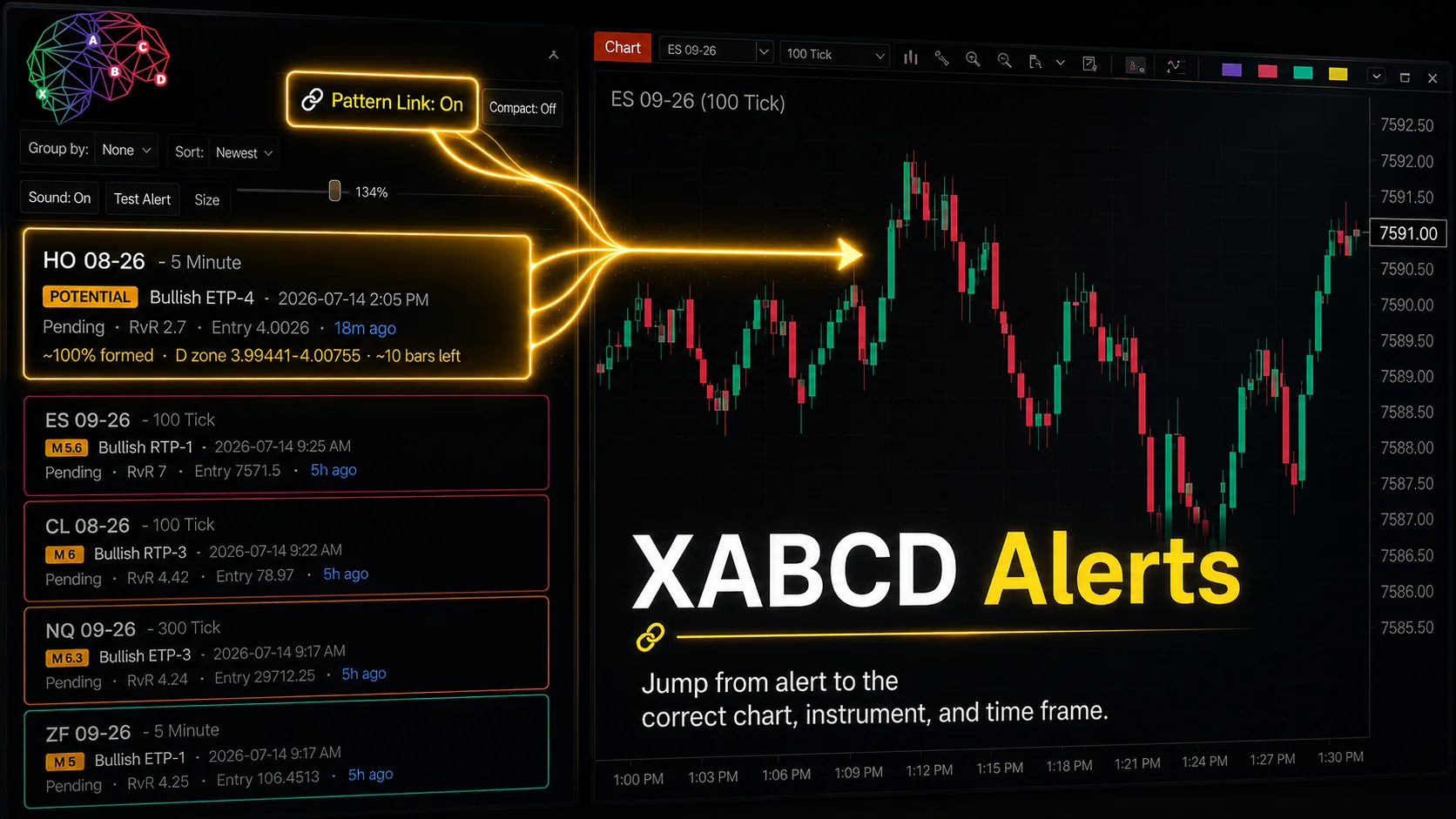
- Draw an alerted pattern on your chart — click any tile on the XABCD Alerts board and that exact pattern is drawn on a matching chart, even when your chart never detected it. A note on the chart explains why it was not already showing: the pattern starts before your loaded history, "Show Last Pattern Only" is hiding it, that pattern type is turned off here, its meter is below your minimum, or a confirmation filter is holding it back. Patterns drawn from an alert carry a leading diamond so they are easy to tell apart from patterns the chart found itself
- Replicate Market Analyzer Patterns — a new toggle under Pattern Search, on by default. Turn it off and the chart shows only patterns it detects for itself, so a click on the alerts board never adds a drawing
- Instrument filter on the alerts board — check instruments on and off the same way you already filter periods, with the list built from the alerts you actually have. The filter label reads "filtered" when your current selection is hiding everything, so an empty board is never a mystery
- Search every settings tab at once — the search box in the XABCD Properties window now filters General Settings, Patterns, Scanner & Alerts and Advanced together, and shows how many settings matched on each tab so you know which one to open
- Changed-from-default markers — a dot appears beside any setting that no longer matches its default, and it updates the moment you change the value. "Changed only" narrows the window to just those rows, and right-clicking a setting resets that one setting to its default without touching anything else
- Appearance presets — Minimal, Standard and Detailed presets on the Style sub-tab set the on-chart display settings in one click
- The properties window remembers your layout — which sections you left open and which sub-tab you were on are restored the next time you open it. Stored separately from your settings, so your layout never travels inside a saved template and is never wiped by Restore Defaults
- Pattern Sync Debug — a new checkbox on the Advanced tab writes a troubleshooting log recording why the chart and the scanner disagreed about a pattern, for the times a board alert will not draw
⬆ Improvements
- General Settings rebuilt — split into Detection, Chart Display and Style sub-tabs, with settings regrouped, duplicates removed, and any setting that depends on another one greyed out while the setting it relies on is off. Every control now has a tooltip explaining what it does
- Leg quality is graded on the weakest leg — the score is now the worst of the four legs rather than their average, and it is capped by that leg's deepest counter-move, so one badly chopped leg can no longer hide behind three tidy ones. The per-leg breakdown is shown alongside the score so you can see which leg set the number
- Reversal Area Mode is honoured everywhere — Time Based and Price Based now change the shape of the reversal area on custom patterns and the multi-point custom tools too. Those previously always drew the full price-based box no matter what the setting said, so switching the mode appeared to do nothing on them
- Numeric settings fields validate as you type — characters that cannot belong in a number are rejected, values outside the allowed range are flagged, whole-number fields round, and a value that cannot be read snaps back to what is actually in effect instead of being silently discarded
- Generating a Market Analyzer template now saves your XABCD Properties at the same time, so the template and the settings it was built from stay in step without a second, separate click
- The scanner now keeps every confirmed alert live rather than only the most recent one, and the alerts board is fed from the Market Analyzer so the two stay in agreement
⚠ Bug Fixes
- Fixed the "Market Analyzer template is out of date" notice staying on screen permanently, including immediately after regenerating the template. It stopped tracking its own state the moment the tab was first drawn, so nothing you did could clear it. The Sync Checker below it was reporting correctly throughout
- Fixed that same notice returning after a restart even though the template was current, because the record of what the template had been generated from was only ever held in memory
- Fixed the properties window asking whether to restore the XABCD Properties to their default values every time NinjaTrader started
- Fixed a crash when choosing Restore Defaults from the properties window
- Fixed toolbar labels overlapping at the top of the XABCD Properties window on narrower screens, where "Changed only" and "Zoom" ran into each other. The toolbar now wraps to a second line instead
- Fixed a pattern drawn from an alert stacking on top of the same pattern the chart had already drawn. The check that spots a duplicate only recognised five-point patterns, so three, four and six point patterns were drawn twice
- Fixed "Show Last Pattern Only" leaving three, four and six point patterns on the chart alongside a pattern drawn from an alert
- Fixed a pattern drawn from an alert filling in grey instead of the colour assigned to that pattern
- Fixed a pattern drawn from an alert showing "No Pattern" instead of its real pattern name
- Fixed a pattern drawn from an alert showing a square reversal area that ignored the time projection — the box now angles in against the target ribbon like every other pattern
- Fixed "Show Last Pattern Only" running its sweep before the chart had finished redrawing, which could leave two patterns on screen
- Fixed six controls across the suite that were unreadable on NinjaTrader's light skin
v1.7.0.60
July 2026
A confirmation-quality and analysis update: new indicator-based confirmation checks at point D (Moving Average, MACD, ADX and RSI level, each with direction-aware modes), an on-board AI pattern analysis with its own AI Reports tab, and an opt-in Community Pattern Database that surfaces similar historical setups and stop/target guidance — plus stability fixes.
✦ New Features
- Confirmation conditions at D — four new optional quality checks you can require when a pattern confirms: Moving Average at D (EMA or SMA, price or slope), MACD at D (histogram or signal cross), ADX at D (trend-strength threshold), and RSI Level at D. Each condition offers direction-aware modes that flip automatically for bullish versus bearish patterns, so you set it once for both
- Conditions feed the meter — every enabled confirmation condition is scored into the Pattern Meter on the chart and in the Market Analyzer, and a new "Require filters to pass" option holds back alerts for confirmed patterns that fail one of your checks
- AI pattern analysis — analyze any pattern straight from the XABCD Alerts board and get a written breakdown in a new "AI Reports" tab, with a per-tile AI badge, cleanly formatted text, and your remaining credit balance shown on the board. Analysis runs in the background and can be cancelled
⬆ Improvements
- Non-blocking analysis — the AI analysis and report windows now open modeless, so opening a report never freezes the alerts board while you keep working
- Resilient AI requests — AI analysis now parses responses defensively and fails gracefully with a clear message instead of erroring out on an unexpected reply
⚠ Bug Fixes
- Fixed an alerts-board hang that could occur when opening the AI or report windows
- Fixed an unhandled clipboard crash (CLIPBRD_E_CANT_OPEN) when using the board's copy actions
v1.7.0.58
July 2026
A pattern-quality and alerting update: a new Quality section that filters out choppy patterns and flags weak legs, a redesigned Scanner & Alerts tab with per-pattern spoken and popup alerts on the XABCD Alerts board, one-click copying of any pattern into your own custom set, and a smarter Market Analyzer scanner that surfaces forming patterns in real time.
✦ New Features
- Quality section — a new "Require Clean Legs" filter drops patterns whose legs wander sideways instead of driving to each point, with tunable Min Leg Quality %, Weak-Leg Min Bars and Weak-Leg Min Slope (ATR). On by default at a gentle threshold
- Spoken pattern alerts — the XABCD Alerts board can read new patterns aloud (text-to-speech), on by default, alongside per-pattern bell and popup alerts you configure in the Scanner & Alerts tab, plus a Test Alert button to preview them
- Copy to a custom pattern — copy any built-in pattern (or an existing custom one) into a new Additional Custom Pattern with one click, carrying its ratios and type; built-in patterns show a read-only View of their ratios, while your own patterns keep full Edit
- Show All Potential Patterns — draw every forming candidate on the chart, and send companion "potential" alerts so the board still shows a forming pattern that is hidden behind a confirmed one
- Alerts board Live mode — show only alerts whose pattern is still live on the chart, with the selected tile highlighted
⬆ Improvements
- Wider detection window — the pattern search now looks back 200 bars instead of 100, so more setups are found
- Chart and scanner in lockstep — Max Bar Count defaults to 10 on both the chart and the Market Analyzer scanner, the scanner auto-aligns its detection settings to the chart, and a built-in sync check flags any remaining differences
- Near-flat legs flagged — a weak leg is now highlighted in white when it barely moves relative to ATR, not only when it is cramped in bars
- Cleaner audio — all alert sounds are serialized through one shared queue so they no longer talk over each other, and sounds are kept alive so they do not cut off mid-playback
- Smarter forming patterns — the scanner drops a forming pattern the moment price closes through its reversal area, or the scan stops finding it
- Scanner tick alignment — Tick, Volume and Range charts load day-based history, with a warning when bar overlap is too low to compare reliably
- RTP-2 reversal — the final leg is now a true min/max range (default 0.886–0.99) for more accurate detection
⚠ Bug Fixes
- Fixed a crash (AccessViolation) caused by leaked drawing resources when rendering the XD time extension
v1.7.0 series
Earlier builds
The 1.7 line consolidated every setting into one XABCD Properties window, unified how patterns are detected in real time and on confirmation, added your own custom pattern definitions, and grew the Market Analyzer scanner and the alerts board.
✦ New Features
- Centralized XABCD Properties window — one place for General, Detection, Validation and Display settings, replacing the old per-drawing property panels
- Selectable detection engines — choose the RealTime engine for live forming patterns or the Confirmation engine, with Show Potential Patterns, Use Price for Potential D, and Require Price in Reversal Area controls
- Custom and Additional Custom Patterns — define your own XABCD ratio sets, each with its own bull and bear colors, alongside the built-in pattern types
- Reversal area projection — time-based or price-based, with configurable box fill, outline and opacity
- Targets and extensions — fib targets, retrace targets, pattern targets, AB fib extensions, and XD time extensions with time ratios, each with its own display toggle and price, tick or percent format
- Time Extensions — three configurable ratio lines (default 113, 127.2, 141.4) with individual colors, plus gap percent and fib text alignment
- Pattern info panel — an on-chart panel with the pattern meter (block or inline layout) that can open automatically when a pattern loads
- Validation controls — Use Bars Before X and Bars Between Points to constrain how a valid pattern may form
- Companion indicators — XT Hurst, XT Sonar, XT ZigZag and XT Price Line ship alongside the pattern engine
⬆ Improvements
- Weak-leg anchor cue — legs that are too cramped in bars are drawn in a distinct color so poorly-formed patterns stand out at a glance
- Theme-aware colors — indicator colors follow your NinjaTrader light or dark skin, with a Custom option when you want your own palette
- Templates — save and load complete settings, including generated Market Analyzer column templates
Foundation
Earlier releases
The core XABCD Pattern Suite for NinjaTrader 8 — automatic pattern detection on any chart, drawing the full structure with its ratios, projecting the reversal area and targets, and scanning the market for new setups.
✦ Foundation
- Automatic XABCD pattern detection — the engine finds bullish and bearish XABCD Patterns on any instrument and timeframe and draws the full X-A-B-C-D structure with ratio labels
- Reversal area — the zone where each pattern completes is projected ahead of price
- Targets — fib and pattern targets projected from the completion point
- Detection controls — Deviation, Minimum Pattern Size and Max Bars Back tune how sensitive the search is
- Market Analyzer column — scan many instruments and timeframes at once for XABCD Patterns
- Built for NinjaTrader 8 — 64-bit, .NET Framework 4.8, with a licensing system and in-app update notifications
v1.7.0.61
July 2026
A pattern-building and analysis update: custom patterns can now be built at three, four, five or six points with a plain-language rule builder, the AI pattern analysis opens as a full visual report you can grade, share and apply to the Position Tool — plus alerts-board additions and stability fixes.
✦ New Features
- Custom patterns at more point counts — build three, four, five or six point custom patterns, each with its own drawing tool ("XT Custom N Point") and its own bull and bear colours, instead of only the classic five-point shape
- Rule-based pattern builder — the custom pattern builder is now a list of plain-language rules (one leg within a range of another) you add and remove freely, replacing the old fixed four-ratio editor. Opening a classic pattern seeds the list from its existing definition, and the on-chart ratio pills now show only the ratios your own rules actually measure
- Export and import custom patterns — move your custom pattern definitions between machines or share them with other traders
- Visual AI report — pattern analysis now opens as a full visual report with a structure-score gauge, scorecard, history histogram and written breakdown side by side (with a draggable splitter), an A/B/C/D grade and verdict stamp, a one-click shareable branded card plus PNG export, and a button to apply the analysed levels straight to the Position Tool. Framed as educational structure analysis, not a guarantee of results
- Alerts board timeframe filter — a multi-select timeframe filter on the XABCD Alerts board so you can narrow the board to just the periods you trade
- Pushover remote alerts — a new Pushover push channel for remote alerts, so new patterns can reach your phone
⬆ Improvements
- Pattern Database naming and edge scoring — the shared-corpus feature is now consistently called the Pattern Database, the "high-edge" verdict is judged on expectancy rather than a flat win-rate, and low-sample historical slices are shrunk so a handful of noisy matches can no longer drive a confident verdict. Board badges are clearer ("PAST HITS", "HISTORY") and the gauge reads "structure score"
- Credit clarity — the alerts board marks the one tile action that spends a credit, offers a manual re-check of your credit balance, and the Buy Credits button now opens the shop product directly
- Cleaner leg-quality grading — a weak leg is now judged on how straight its connector line runs rather than on candle-by-candle chop, so genuinely clean legs stop being flagged
- Custom tool identification — custom drawing tools can show an optional tool-number badge and highlight on hover, making it easy to tell several tools apart on one chart
- Market Analyzer template builder — adds a "Default" preset and resolves preview-refresh and theming issues in the generated workspace
⚠ Bug Fixes
- Fixed a cross-thread crash when adding a custom pattern, and a colour-related crash when drawing custom patterns
- Fixed the settings wrench that could become unclickable (it is now hit-tested in chart space) and stopped the Properties window silently failing to open
- Fixed custom pattern rules being corrupted when a saved pattern was reloaded, and a remove button that was invisible in the pattern builder
- Blocked a second Pattern Builder window from being opened at the same time
- Fixed the confidence gauge sometimes not filling
v1.7.0.60
July 2026
A confirmation-quality and analysis update: new indicator-based confirmation checks at point D (Moving Average, MACD, ADX and RSI level, each with direction-aware modes), an on-board AI pattern analysis with its own AI Reports tab, and an opt-in Community Pattern Database that surfaces similar historical setups and stop/target guidance — plus stability fixes.
✦ New Features
- Confirmation conditions at D — four new optional quality checks you can require when a pattern confirms: Moving Average at D (EMA or SMA, price or slope), MACD at D (histogram or signal cross), ADX at D (trend-strength threshold), and RSI Level at D. Each condition offers direction-aware modes that flip automatically for bullish versus bearish patterns, so you set it once for both
- Conditions feed the meter — every enabled confirmation condition is scored into the Pattern Meter on the chart and in the Market Analyzer, and a new "Require filters to pass" option holds back alerts for confirmed patterns that fail one of your checks
- AI pattern analysis — analyze any pattern straight from the XABCD Alerts board and get a written breakdown in a new "AI Reports" tab, with a per-tile AI badge, cleanly formatted text, and your remaining credit balance shown on the board. Analysis runs in the background and can be cancelled
⬆ Improvements
- Non-blocking analysis — the AI analysis and report windows now open modeless, so opening a report never freezes the alerts board while you keep working
- Resilient AI requests — AI analysis now parses responses defensively and fails gracefully with a clear message instead of erroring out on an unexpected reply
⚠ Bug Fixes
- Fixed an alerts-board hang that could occur when opening the AI or report windows
- Fixed an unhandled clipboard crash (CLIPBRD_E_CANT_OPEN) when using the board's copy actions
v1.7.0.58
July 2026
A pattern-quality and alerting update: a new Quality section that filters out choppy patterns and flags weak legs, a redesigned Scanner & Alerts tab with per-pattern spoken and popup alerts on the XABCD Alerts board, one-click copying of any pattern into your own custom set, and a smarter Market Analyzer scanner that surfaces forming patterns in real time.
✦ New Features
- Quality section — a new "Require Clean Legs" filter drops patterns whose legs wander sideways instead of driving to each point, with tunable Min Leg Quality %, Weak-Leg Min Bars and Weak-Leg Min Slope (ATR). On by default at a gentle threshold
- Spoken pattern alerts — the XABCD Alerts board can read new patterns aloud (text-to-speech), on by default, alongside per-pattern bell and popup alerts you configure in the Scanner & Alerts tab, plus a Test Alert button to preview them
- Copy to a custom pattern — copy any built-in pattern (or an existing custom one) into a new Additional Custom Pattern with one click, carrying its ratios and type; built-in patterns show a read-only View of their ratios, while your own patterns keep full Edit
- Show All Potential Patterns — draw every forming candidate on the chart, and send companion "potential" alerts so the board still shows a forming pattern that is hidden behind a confirmed one
- Alerts board Live mode — show only alerts whose pattern is still live on the chart, with the selected tile highlighted
⬆ Improvements
- Wider detection window — the pattern search now looks back 200 bars instead of 100, so more setups are found
- Chart and scanner in lockstep — Max Bar Count defaults to 10 on both the chart and the Market Analyzer scanner, the scanner auto-aligns its detection settings to the chart, and a built-in sync check flags any remaining differences
- Near-flat legs flagged — a weak leg is now highlighted in white when it barely moves relative to ATR, not only when it is cramped in bars
- Cleaner audio — all alert sounds are serialized through one shared queue so they no longer talk over each other, and sounds are kept alive so they do not cut off mid-playback
- Smarter forming patterns — the scanner drops a forming pattern the moment price closes through its reversal area, or the scan stops finding it
- Scanner tick alignment — Tick, Volume and Range charts load day-based history, with a warning when bar overlap is too low to compare reliably
- RTP-2 reversal — the final leg is now a true min/max range (default 0.886–0.99) for more accurate detection
⚠ Bug Fixes
- Fixed a crash (AccessViolation) caused by leaked drawing resources when rendering the XD time extension
v1.7.0 series
Earlier builds
The 1.7 line consolidated every setting into one XABCD Properties window, unified how patterns are detected in real time and on confirmation, added your own custom pattern definitions, and grew the Market Analyzer scanner and the alerts board.
✦ New Features
- Centralized XABCD Properties window — one place for General, Detection, Validation and Display settings, replacing the old per-drawing property panels
- Selectable detection engines — choose the RealTime engine for live forming patterns or the Confirmation engine, with Show Potential Patterns, Use Price for Potential D, and Require Price in Reversal Area controls
- Custom and Additional Custom Patterns — define your own XABCD ratio sets, each with its own bull and bear colors, alongside the built-in pattern types
- Reversal area projection — time-based or price-based, with configurable box fill, outline and opacity
- Targets and extensions — fib targets, retrace targets, pattern targets, AB fib extensions, and XD time extensions with time ratios, each with its own display toggle and price, tick or percent format
- Time Extensions — three configurable ratio lines (default 113, 127.2, 141.4) with individual colors, plus gap percent and fib text alignment
- Pattern info panel — an on-chart panel with the pattern meter (block or inline layout) that can open automatically when a pattern loads
- Validation controls — Use Bars Before X and Bars Between Points to constrain how a valid pattern may form
- Companion indicators — XT Hurst, XT Sonar, XT ZigZag and XT Price Line ship alongside the pattern engine
⬆ Improvements
- Weak-leg anchor cue — legs that are too cramped in bars are drawn in a distinct color so poorly-formed patterns stand out at a glance
- Theme-aware colors — indicator colors follow your NinjaTrader light or dark skin, with a Custom option when you want your own palette
- Templates — save and load complete settings, including generated Market Analyzer column templates
Foundation
Earlier releases
The core XABCD Pattern Suite for NinjaTrader 8 — automatic pattern detection on any chart, drawing the full structure with its ratios, projecting the reversal area and targets, and scanning the market for new setups.
✦ Foundation
- Automatic XABCD pattern detection — the engine finds bullish and bearish XABCD Patterns on any instrument and timeframe and draws the full X-A-B-C-D structure with ratio labels
- Reversal area — the zone where each pattern completes is projected ahead of price
- Targets — fib and pattern targets projected from the completion point
- Detection controls — Deviation, Minimum Pattern Size and Max Bars Back tune how sensitive the search is
- Market Analyzer column — scan many instruments and timeframes at once for XABCD Patterns
- Built for NinjaTrader 8 — 64-bit, .NET Framework 4.8, with a licensing system and in-app update notifications