XABCD TRADING
Custom Patterns and Adding Them to Your XABCD Indicators
Subscribe
to get alerts to our next blog post!
Custom Patterns Step-By-Step
Custom patterns can be done in both the NinjaTrader software we have and the MetaTrader 4 software. We're going to show you a video on how to do this below, but you can also follow the written step by step instructions on creating custom patterns below.
Watch this video to see how step by step...
If you have any questions after watching this video, please feel free to contact us in the live chat on the left side of the screen and we'd be more than happy to answer any specific questions you might have too.
Are you wanting to create custom patterns of your own? Here is a step -by-step guide to show you how to do it with ease with our NinjaTrader 8 XABCD Pattern Indicators.
Step 1) Understand the pattern you want to draw
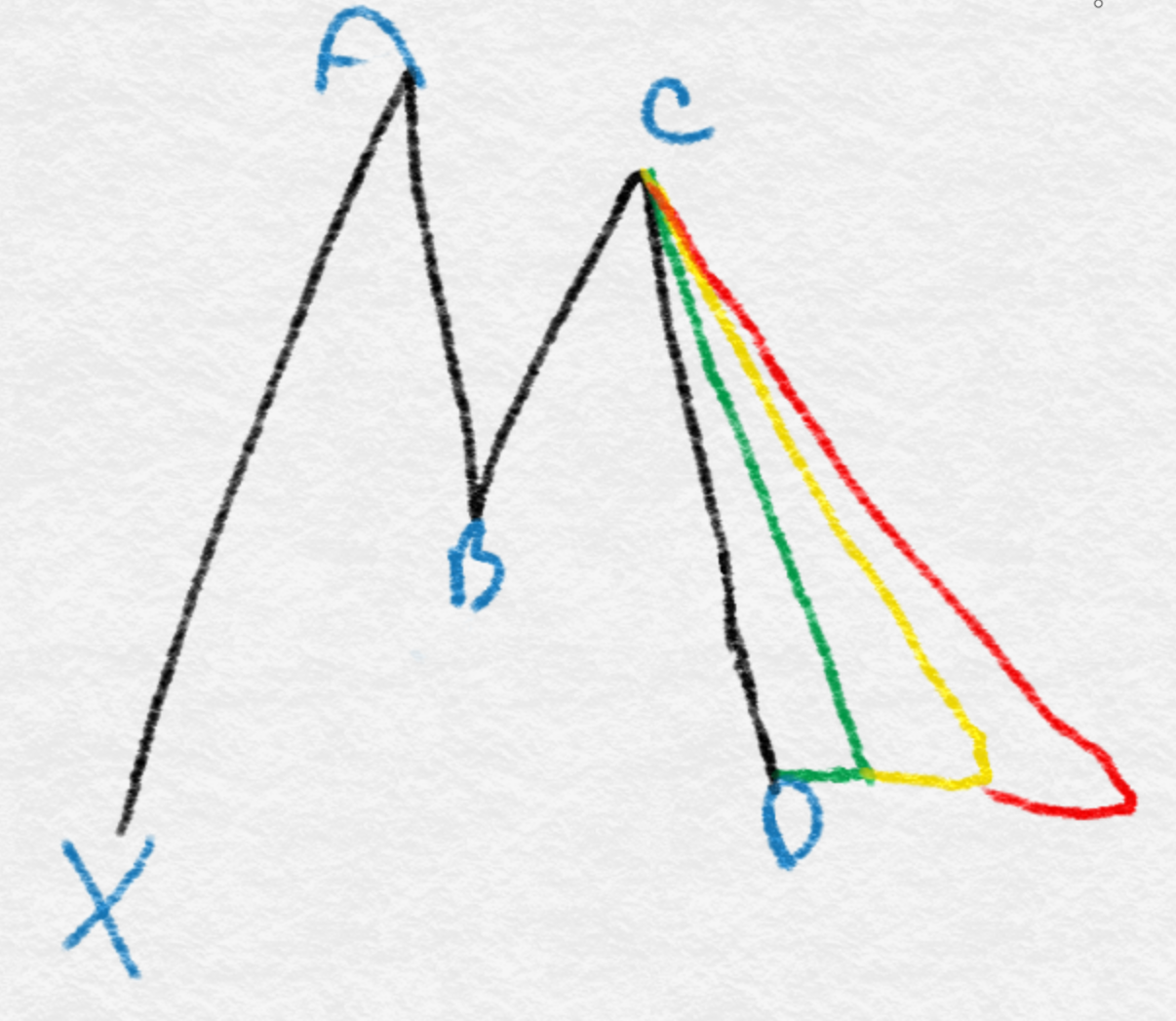
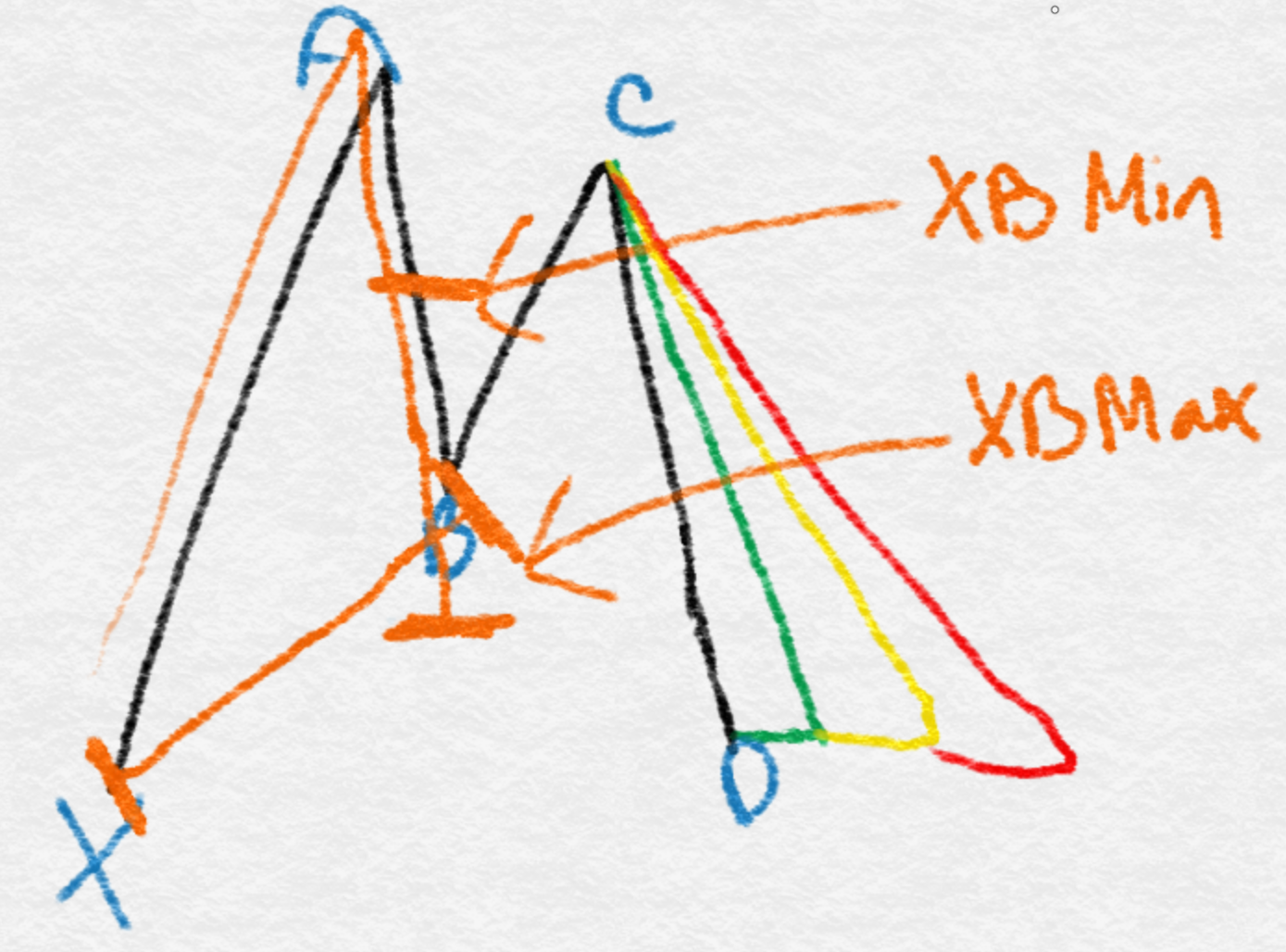
Take the time to draw the pattern manually and label the pattern marker's and ratios. You might find it helpful to do this on a piece of paper and a pencil (I know, old school stuff) but should look something like this below. If you are weighing whether to keep sketching patterns by hand or let software find them, our guide on drawing XABCD patterns compares both approaches.
Draw the shape, label the pattern and you will find it easier going forward.
Step 2) Marking in the ratios
You can then start marking in your ratios. The first ratio for example is going to measure from our X to A point which will create the retracement size.
This ratio will be known as the XB ratio because it will be the ratio measured from the X point, creating the B point.
This value could have a minimum retracement value and a maximum. So this would give us XB Min and XB Max as we've labeled here.
Step 3) Minimum and Maximum Ratios in Custom Patterns
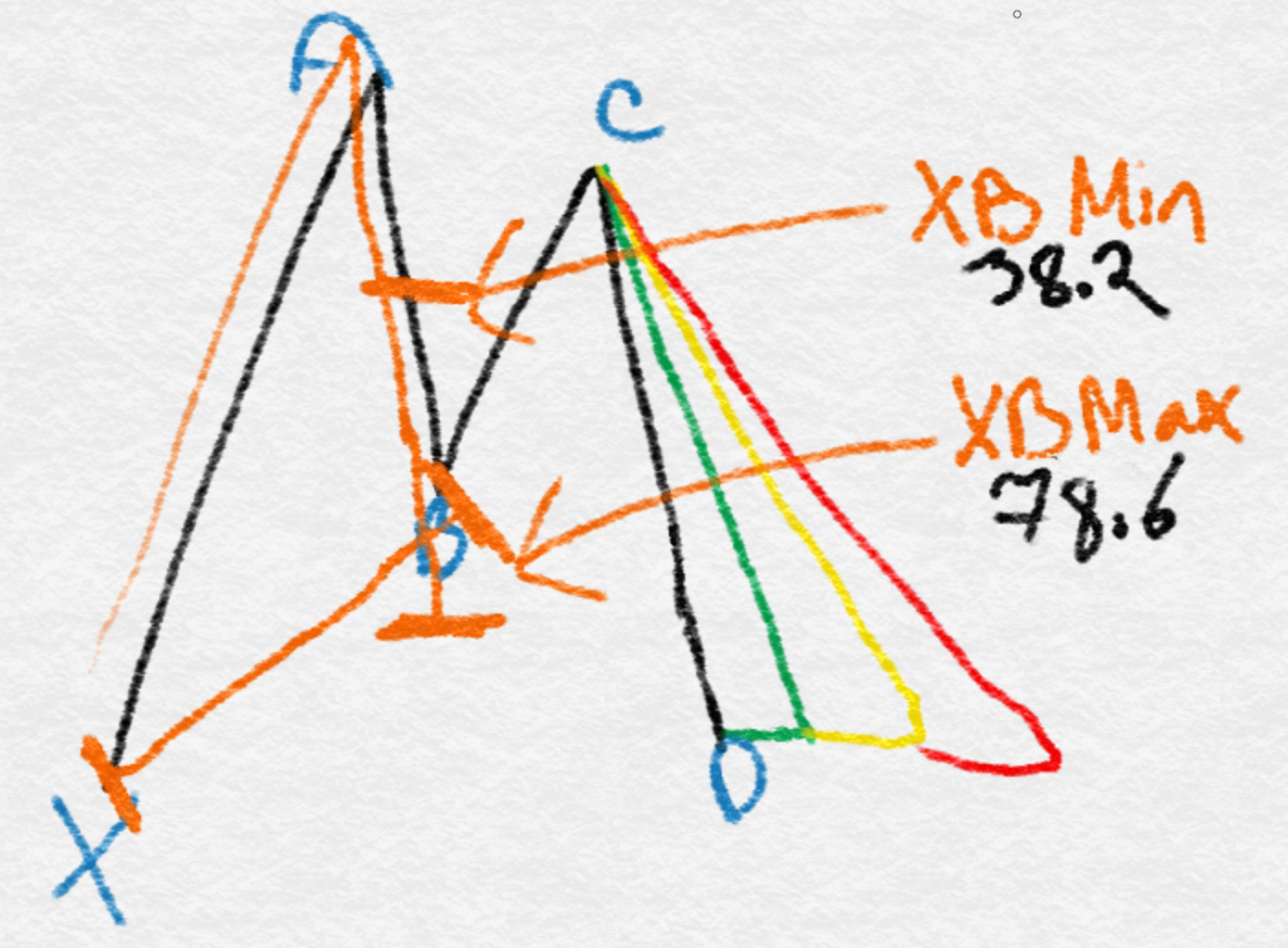
The minimum amount for the tracement is going to be the lowest number (Eg, a 38.2 in the image below) and the maximum it can retrace is a 78.6. So your XB min and XB max would then be put into your NinjaTrader or MetaTrader results.
Step 3) Minimum and Maximum Ratios in Custom Patterns
The minimum amount for the tracement is going to be the lowest number (Eg, a 38.2 in the image below) and the maximum it can retrace is a 78.6. So your XB min and XB max would then be put into your NinjaTrader or MetaTrader results.
Step 4) Minimum and Maximum Ratios in Custom Patterns
Enter the following:
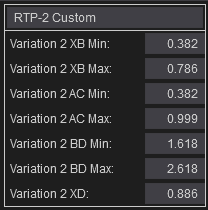
Variation 2 XB Min: 0.382
Variation 2 XB Max: 0.786
Just like what we have done below in your XABCD Properties. You can get to that by going into your Control Center then to XABCD Properties and the window with this block will come up.
Step 5) Rinse and Repeat!
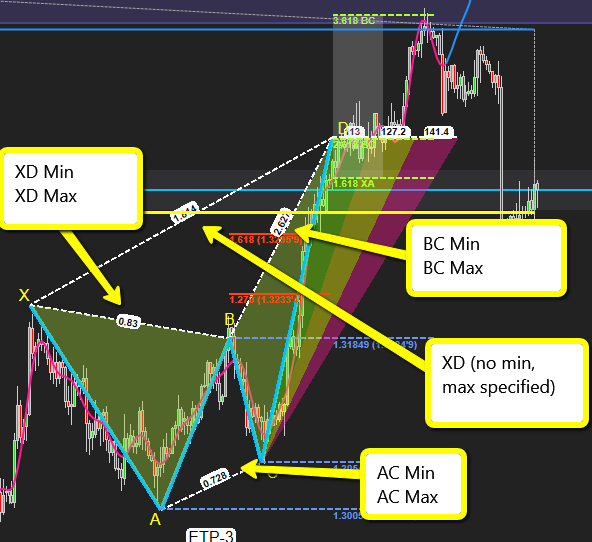
Now you just need to do this for the rest of the pattern. You can follow the same sequence:
The ratio between the A and C points is your AC Min and AC Max, and the extensions from your C to D point will be your BD Min and BD Max, and the final XD extension is from your X to D and is just one single value.
Now The Time Ratios?
The time ratios are automatically already set but you can change these in the XABCD Properties 2 tab. Our time ratios get measured automatically between each pattern point. You can also change the external time pattern points which you can see us using in the green, yellow and red territory.
Frequently Asked Questions
What are custom patterns and how are they used?
Custom patterns are unique, user-created designs or templates tailored to specific needs, commonly used in sewing, knitting, graphic design, software development, and manufacturing. They allow creators to move beyond standard templates and produce personalized results that match exact specifications, dimensions, or aesthetic preferences.
How do I create custom patterns for sewing?
To create custom sewing patterns, start by taking accurate body measurements, then draft your design on pattern paper using those measurements as a guide. You can also modify existing commercial patterns to achieve a custom fit. Many crafters use digital tools like pattern-drafting software to streamline the process and ensure precision.
What software can I use to design custom patterns?
Popular software for designing custom patterns includes Adobe Illustrator, Seamly2D, Valentina, and PatternMaker for garment patterns, while tools like Adobe Photoshop and Canva work well for repeating surface patterns. The best choice depends on whether you need patterns for textiles, digital design, woodworking, or another application.
Can I sell patterns I create myself?
Yes, you can sell patterns you create yourself as long as the designs are original and do not infringe on existing copyrights or trademarks. Many creators sell custom patterns through online marketplaces like Etsy, Ravelry, or their own websites. It is important to clearly outline usage rights for buyers in your listing.
What is the difference between custom patterns and standard patterns?
Standard patterns are pre-made, mass-produced templates designed to fit general sizes or common specifications, while custom patterns are individually created or modified to meet unique requirements. Custom patterns offer a more precise fit and greater design flexibility, making them ideal for projects that demand personalization or non-standard dimensions.
Frequently Asked Questions
What are custom patterns and how are they used?
Custom patterns are unique, user-created designs or templates tailored to specific needs, commonly used in sewing, knitting, graphic design, software development, and manufacturing. They allow creators to move beyond standard templates and produce personalized results that match exact specifications, dimensions, or aesthetic preferences.
How do I create custom patterns for sewing?
To create custom sewing patterns, start by taking accurate body measurements, then draft your design on pattern paper using those measurements as a guide. You can also modify existing commercial patterns to achieve a custom fit. Many crafters use digital tools like pattern-drafting software to streamline the process and ensure precision.
What software can I use to design custom patterns?
Popular software for designing custom patterns includes Adobe Illustrator, Seamly2D, Valentina, and PatternMaker for garment patterns, while tools like Adobe Photoshop and Canva work well for repeating surface patterns. The best choice depends on whether you need patterns for textiles, digital design, woodworking, or another application.
Can I sell patterns I create myself?
Yes, you can sell patterns you create yourself as long as the designs are original and do not infringe on existing copyrights or trademarks. Many creators sell custom patterns through online marketplaces like Etsy, Ravelry, or their own websites. It is important to clearly outline usage rights for buyers in your listing.
What is the difference between custom patterns and standard patterns?
Standard patterns are pre-made, mass-produced templates designed to fit general sizes or common specifications, while custom patterns are individually created or modified to meet unique requirements. Custom patterns offer a more precise fit and greater design flexibility, making them ideal for projects that demand personalization or non-standard dimensions.
Still have a question about this?Ask the XABCD team in Live Chat and get help with your setup.Ask in Live Chat →
New NinjaTrader Articles Delivered First
Free tutorials, fixes and setup guides by email. Two emails a month at most.
Free tutorials, fixes and setup guides by email. Two emails a month at most.
Recommended Tool
XABCD ATM Pack
23 free ATM strategy templates for NinjaTrader 8. Import them and start with your stops and targets already set up.
Get the Free ATM Pack →
Recommended Video
Ditch NinjaTrader ATMs: This Is More Powerful
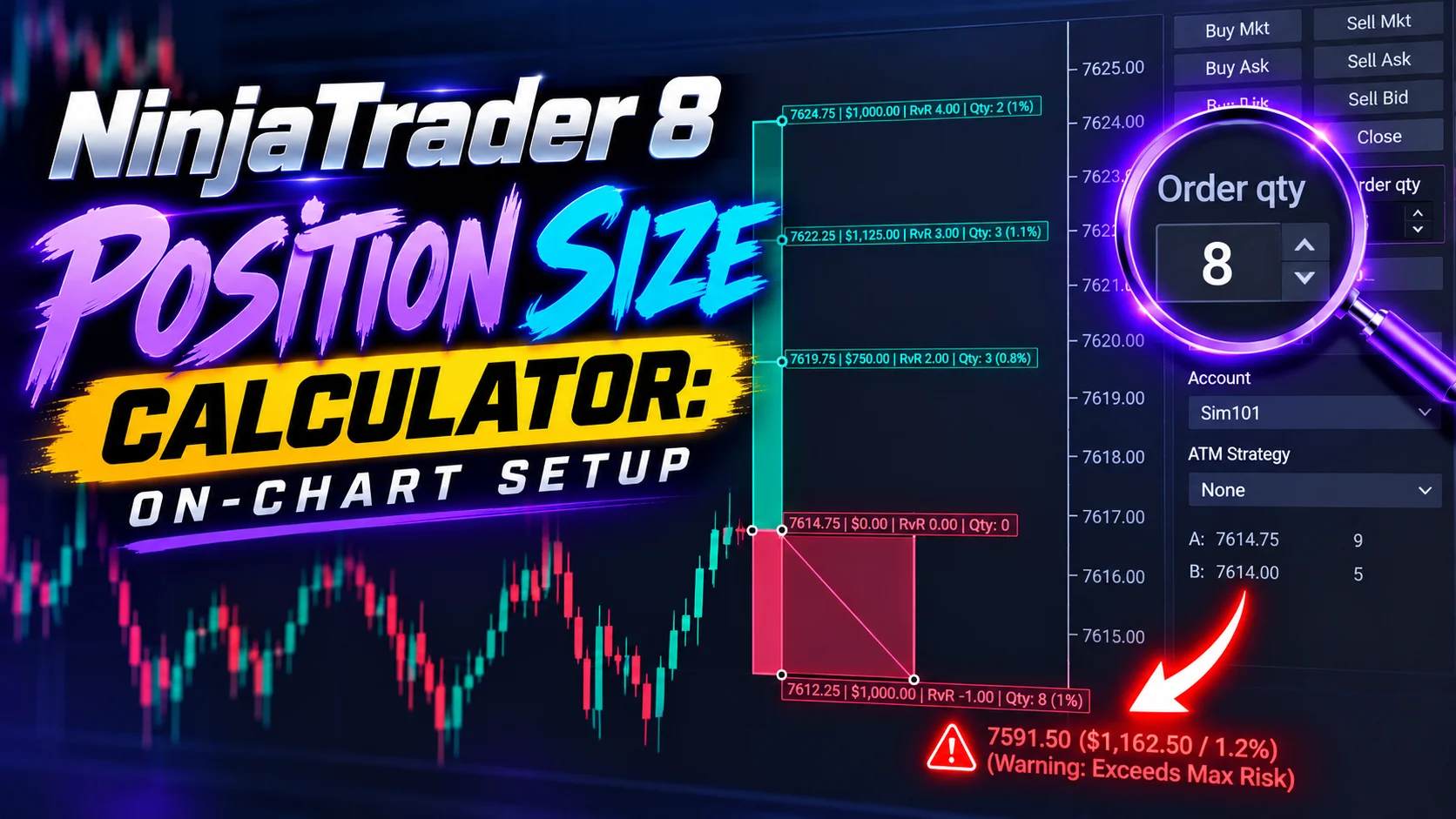
See how to set your risk and calculate contracts directly on the chart.
Watch Now
Subscribe on YouTube
Related Tool
XABCD ATM Pack
23 free ATM strategy templates for NinjaTrader 8. Import them and start with your stops and targets already set up.
Get the Free ATM Pack
Why XABCD Trading
- Built for NinjaTrader 8 since 2009
- Trusted by 2,000+ traders
- On-chart tools, no ATM templates needed
- Free tools to get started
Get Project Updates
Twice-monthly maximum, we will give you updates on all the projects going here.
Quick Links